Studio A3: Redesigning AR/VR Lesson Creation for K–12 Classrooms
Impact
apps powered by the A3 design system
4
average ship time for subsequent apps, down from 9
~6–7 mo
components in a shared system built from scratch
211
Overview
Studio A3 is zSpace’s flagship AR/VR creation tool, used in thousands of K–12 classrooms. When I joined the project, it was powerful but fragmented. The creation process was complex, content discovery felt disconnected from the main workflow, and the tool depended heavily on specialized hardware. I led the design strategy and visual redesign, streamlining the core experience and establishing a foundation for a scalable design system that now supports the broader zSpace product suite.
The Problem
Studio A3 had the right capabilities, but the experience made them hard to reach.
The creation tools were powerful but overwhelming for non-technical teachers.
Finding and launching existing content required navigating outside the app, breaking classroom flow.
Reliance on a specialized stylus meant the experience wasn't equally accessible across all classroom setups.

Figure 1: The Legacy Interface. Users were forced to manage multiple floating windows and disconnected toolbars, resulting in high cognitive load and an obscured workspace.
The Solution
We rethought the creation model from the ground up, building it around a familiar slide‑deck metaphor that teachers already understood. Content discovery was integrated directly into the app, and input support was expanded so more students across different classroom setups could participate
Key Decisions
01. Reducing Cognitive Load with Familiar Patterns
The original editor was capable but overwhelming, with too many panels and too much to learn before anything useful could happen. We restructured the editor around a slide-and-notebook model with a Slide Builder for assembling 3D scenes and a Notebook Builder for adding questions and prompts. This approach gave teachers a familiar format inspired by PowerPoint and Google Slides. The student-facing Notebook interface was kept intentionally clean and free of editing tools to reduce distraction during lessons.
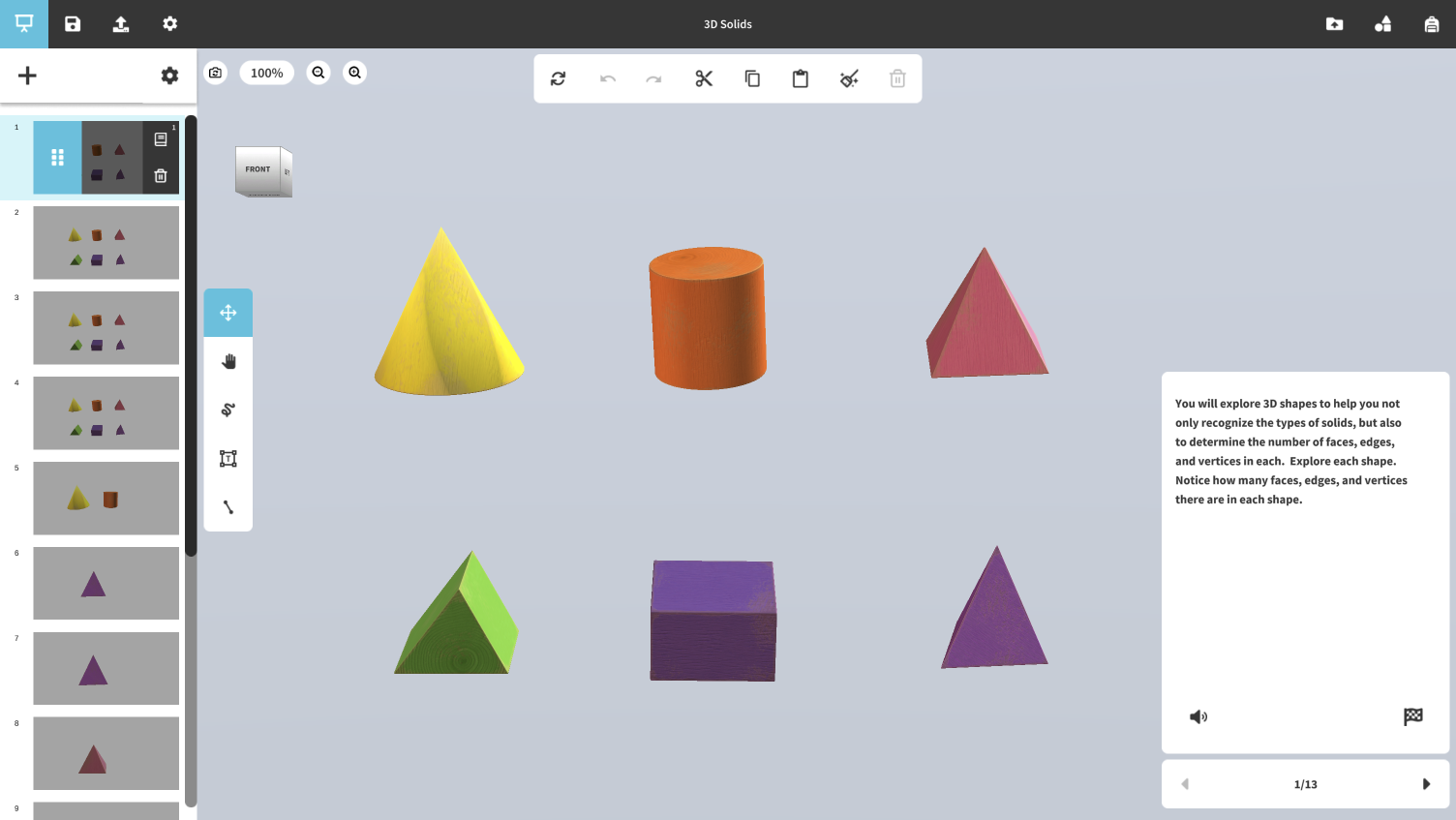
Figure 2: The new "Slide Builder" adopts a linear presentation metaphor. By placing scene management on the left rail and contextual tools on the right, we aligned the interface with tools teachers already use daily.
02. Bringing discovery and creation together
Previously, finding and launching new lessons required leaving the app entirely, interrupting the flow of classroom activities. I designed an integrated Activity Gallery that allowed teachers to browse, preview, and launch lessons directly within Studio A3. Combined with the built-in Model Gallery for open exploration, the experience evolved into a more seamless sandbox where discovery and creation could happen side by side.

Figure 3: The unified Activity Gallery. Previously, content was hidden in zCentral; this visual grid allows for instant discovery, previewing, and launching of curriculum-aligned lessons without leaving the app.
03. Designing for broader input support
The original experience was centered around zSpace’s stylus hardware. To make the platform more adaptable across different classroom setups, I designed mouse and trackpad support through dedicated 2D interaction gizmos that made 3D manipulation intuitive on standard laptops while preserving the stylus experience for those who used it.

Figure 4: Mouse interaction has been enabled by adding dedicated gizmos for users of both mouse and trackpads, improving input support and usability.
See the Impact in the Classroom
Studio A3 in use during an eighth‑grade science lesson on energy and states of matter at Chinle Junior High. The familiar structure and intuitive interactions allowed the teacher to guide the lesson smoothly while keeping students actively engaged.
System Impact
What began as a redesign for one AR/VR creation tool evolved into the foundation for a broader design system. The visual language and interaction patterns developed for Studio A3 became the basis of the A3 Design System, a library of 211 components built from scratch and now shared across Franklin’s Lab, Newton’s Park, and Math Island. By standardizing patterns and components, the team reduced build times from nine months for the first app to about six months for each that followed. The system established a shared design language that brought consistency, efficiency, and cohesion to the entire zSpace ecosystem
Takeaway
Studio A3 reshaped how I think about designing for non‑technical users. I learned that adoption starts with trust, and trust often begins with familiarity. Every design decision was rooted in what teachers already understood. The design system grew out of that same mindset, showing how a consistent foundation can help products feel connected and make each new one easier to build.
zSpace Studio is currently undergoing a ground-up redesign, informed by years of real classroom use. Launching 2026.